
GA4 Guide for non-marketers
Google Analytics 4, or GA4, may seem intimidating if you're not involved in digital marketing.
There are reports, events, dimensions, metrics, audiences and enough acronyms to make it tempting to simply close the browser and leave it to someone else…
You don't need digital marketing expertise to get useful information from GA4.
For a dealer principal, sales manager, business owner, or anyone responsible for an automotive website's performance, GA4 can offer valuable insights into how potential customers behave on your site. You don't need to fully understand how GA4 is set up or how tracking works; your website manager or digital marketing team should be able to handle that.
What matters is being able to understand the information and the questions it can help you answer.
What is GA4?
GA4 is Google's website analytics platform; it gathers information on how people use your website and presents it as reports.
For an automotive business, this can include information such as:
- How many people are visiting your website
- Which pages they are looking at
- Which vehicles or models are attracting attention
- How people are finding your website
- Whether visitors are using mobile, tablet or desktop
- How many people are making enquiries
- How often people click to call or make other contact
- Which parts of your website are generating the most interest
Remember that GA4 only tracks website activity and does not replace your CRM, sales system, or stock management system.
For instance, GA4 can inform you that 50 people filled in the enquiry form; it will not automatically tell you how many of those enquiries resulted in sales unless the appropriate systems are linked and the information is sent back to your analytics. View GA4 as a tool for understanding what is happening on your website, not as a full overview of all the activities in your business.
You don't need to understand everything in GA4
A major error people make when using GA4 is trying to understand every report. You really don't have to. Although GA4 is designed to offer a large amount of information, that doesn't mean all of it is relevant to you. Suppose you're operating a dealership; in that case, you're unlikely to want to spend your afternoon examining individual user journeys or figuring out the difference between each available dimension and metric.
Why not start with a few simple questions?
How many people are visiting my website?
This is one of the simplest questions GA4 can answer.
You can look at the number of users visiting your website over a particular period and compare it with previous periods.
For example:
- Has traffic gone up or down?
- Are there seasonal changes?
- Did traffic change noticeably after a new car launch or a sales promotion?
- Is traffic about the same from month to month?
Don't fixate too much on one figure.
A website receiving 10,000 visits isn't automatically performing better than one receiving 5,000. What those visitors do once they arrive is often much more important.
That leads to the next question…
What are people actually looking at?
This is especially useful for an automotive website.
Even if you have hundreds of vehicles on your website, GA4 can help you to see which parts of your stock are getting the most attention.
You might discover that:
- A specific model is receiving a lot of interest
- Used Suzuki Swifts are especially popular
- A particular new car model is attracting more attention than others
- Your used vehicle pages are receiving more traffic than your new vehicle pages
- Certain service or aftersales pages are attracting significant interest
This information can help your entire business. For instance, if you are thinking about offering new aftersales services, or increasing your used car stock, knowing what resonates with your current audience can help you make those decisions. GA4 will not tell you what stock you should carry, or what new service(s) you should offer, but it can show you what your website visitors are interested in.
Where are people coming from?
Another useful area of GA4 is understanding where your website visitors came from.
You may see traffic from channels such as:
- Organic Search
- Cross-network
- Paid Social
- Referral
- Direct
This can help answer a simple question:
How are people finding us?
For instance, if a large proportion of traffic comes from Organic Search, it means your website is gaining visitors who find you on search engine result pages such as Google or Bing.
If you are running Google Ads, you can also look at traffic generated by Cross-network, Paid Search or Paid Social.
But, just remember, traffic source and website performance are two separate things.
More visitors coming via Organic Search may seem advantageous, but you should also find out what these visitors do when they arrive.
Are people contacting us?
For most dealerships, understanding this is one of the most important things.
A website's purpose isn't just to attract visitors; it should generate enquiries and, in the end, lead to sales.
Depending on how your website has been set up, GA4 may be able to report actions such as:
- Contact form submissions
- Vehicle enquiries
- Test drive enquiries
- Finance enquiries
- Valuation requests
- Clicks on telephone numbers
GA4 often calls these Conversions or Key Events.
You don't need to understand the technical process. What matters is that these actions have some greater significance than someone just visiting a page.
For instance, knowing that 1,000 people have looked at your used cars is useful information, but knowing that 35 of them went on to enquire about a vehicle is potentially much more valuable.
What is a "Conversion" or "Key Event"?
You'll come across this terminology frequently in GA4.
Simply put, a key event is an action that is considered important for your business; for an automotive dealer, this might be a vehicle enquiry, a click-to-call, or a test drive request.
The particular actions that are being measured will depend on the way your website and the analytics have been set up. At Autoweb, as a default we track every form, every click to call, every viable live chat interaction; plus, any other actions a client deems important. If you're not sure what your GA4 account currently measures, ask your website manager or digital marketing provider for a list of the key events being tracked.
Once you know this, the numbers in GA4 become much easier to understand.
What devices are people using?
GA4 can also show whether people are accessing your website from:
- Mobile phones
- Desktop computers
- Tablets
For automotive websites, mobile usage is particularly important. A potential customer might be browsing vehicles on their phone while travelling, during a lunch break or sitting at home.
If the majority of your visitors are using mobile devices, that reinforces the importance of having a website that makes it easy to:
- Search for vehicles
- View vehicle information and images
- Check pricing and finance information
- Contact the dealership
- Make an enquiry
Again, GA4 isn't just about numbers. It can help you understand how potential customers use your website.
Which pages are people visiting?
GA4 can show which pages on your website get the most traffic.
For a dealership, this might include:
- Homepage
- New vehicle model pages
- Used vehicle search pages
- Individual vehicle listings
- Aftersales pages
- Finance pages
This can help you understand which areas of the website are attracting attention. It can also highlight pages that may not be receiving as much traffic as expected.
For example, if you've recently launched a new promotion but very few people are visiting the relevant page, that could be worth investigating.
Don't confuse traffic with success
This is probably the most important thing to understand when looking at GA4; increased traffic doesn't necessarily mean it's better.
Imagine two dealerships:
Dealer A
- 20,000 website visitors
- 40 enquiries
Dealer B
- 10,000 website visitors
- 60 enquiries
Although Dealer B has only half the traffic, it has more enquiries. This doesn't necessarily indicate that Dealer B has the better website since the difference could be attributable to a number of factors such as effective marketing strategies, competitive pricing, engaging offers, and clear calls to action, etc. It does show, however, that it is not enough to look only at the number of visitors; you must also consider what visitors do once they arrive.
Look for trends rather than individual numbers
You don't need to worry about whether the number of users was 8,421 or 8,673 last month; focus on significant changes over time.
For example:
- Has website traffic increased?
- Are vehicle enquiries increasing?
- Is one model getting more attention?
- Has the traffic from Google changed a great deal?
- Are more people using mobile devices?
You can also compare different periods, which makes GA4 much more useful.
You might compare:
- This month vs last month
- This month vs the same month last year
- This quarter vs the previous quarter
Seasonality is just as relevant in the Automotive industry, since website traffic varies by time of year, new vehicle launches, registration periods, promotional activities, and changes in the vehicle range.
What GA4 can't tell you
It's just as important to understand what GA4 doesn't tell you.
GA4 doesn't automatically know:
- Whether someone who submitted an enquiry actually bought a car
- Whether a telephone call resulted in a sale
- Whether a particular customer is likely to buy
- How profitable a particular customer was
- Whether a vehicle sold because someone first saw it on your website
- Everything that happened before or after someone visited your website
That is why you should consider GA4 alongside other business information. Your CRM, DMS, lead management system, sales figures and other reporting can provide information that Google Analytics can't.
The real value comes from looking at these different sources together.
GA4 terminology without the jargon
If you do spend time in GA4, you'll come across some terminology that can initially seem confusing.
Here's a simplified explanation:
|
|
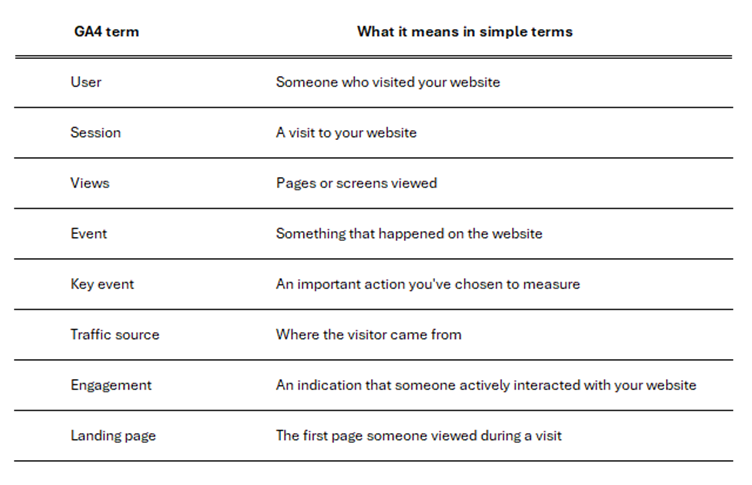
You don't need to memorise these terms. The important thing is understanding what the information is telling you.
Don't let GA4 become another job
GA4 can provide a huge amount of information, but you don't need to become an analytics expert to benefit from it.
For most dealership decision-makers, the value isn't in knowing every feature within GA4. It's in being able to look at the data and understand what it means for the business. The best analytics reporting isn't about presenting as many numbers as possible. It's about answering the questions that matter to your business. GA4 helps you understand what is happening on your website. The key is knowing which questions to ask.