
Key Takeaways (TL;DR)•The Monolith Myth: Dealerships do not need to buy an expensive, all-in-one enterprise CRM to achieve a "unified customer view."•The API Alternative: You can connect your existing, highly functional "best-of-breed" systems (DMS, LMS, Workshop) using Integration Platform as a Service (iPaaS) tools.•Data Sovereignty: Building your own connections ensures you retain total ownership of your data, avoiding steep monthly licensing fees and vendor lock-in.•Advanced Capabilities: A connected tech stack allows dealerships to deploy proprietary AI models and advanced marketing automation tailored to their specific business needs.
Key Takeaways (TL;DR)
-
The Monolith Myth: Dealerships do not need to buy an expensive, all-in-one enterprise CRM to achieve a "unified customer view."
-
The API Alternative: You can connect your existing, highly functional "best-of-breed" systems (DMS, LMS, Workshop) using Integration Platform as a Service (iPaaS) tools.
-
Data Sovereignty: Building your own connections ensures you retain total ownership of your data, avoiding steep monthly licensing fees and vendor lock-in.
-
Advanced Capabilities: A connected tech stack allows dealerships to deploy proprietary AI models and advanced marketing automation tailored to their specific business needs.
The automotive retail industry is currently being sold a dream. The dream is a "unified customer view"—a single interface where every interaction, from the first website visit to the fifth service appointment, is tracked, understood, and actionable. It is a beautiful vision, and it is absolutely the right goal for any modern dealership looking to maximise customer lifetime value.
But the way this dream is often sold comes with a heavy catch: the requirement to rip out your entire existing tech stack, migrate to a monolithic enterprise CRM, and commit to steep, per-user monthly licensing fees. You are told that the only way to get your systems to talk to each other is to buy them all from the same vendor.
It doesn't have to be this way.
The Reality of the Showroom Floor
Most franchised dealerships already have a highly functional, battle-tested technology stack. You have a Dealer Management System (DMS) that handles the heavy lifting of finance and stock. You have a Lead Management System (LMS) that your sales team knows inside out. You have an aftersales platform that keeps the workshop running efficiently.
These systems are often "best-of-breed"—they are exceptionally good at the specific jobs they were built to do. The problem isn't the software itself; the problem is the quiet between them. When a deal is closed in the LMS, the aftersales system doesn't automatically know about it. When a customer browses your website looking for an upgrade, the sales team isn't alerted.
The API Alternative: Connect, Don't Replace
"The future of automotive retail isn't about buying one massive system that forces you to change how you work. It is about connecting the best tools that do exactly what you need them to do."
— Martin Dew, Autoweb Design
There is a better alternative to the vendor-locked, rip-and-replace approach. Instead of buying a massive, expensive monolithic system, you can build a connective layer between the excellent tools you already use.
By using open APIs and automation tools, you can create a tech stack that works exactly the way your dealership operates, while retaining total ownership of your data and avoiding massive monthly software fees.
This is an example of how this could work for you (and the steps you would need to take):
A quick disclaimer: When choosing cloud-based systems, check where the data is stored and how secure it is to ensure compliance with regulations and keep your data safe. This applies whether you take an approach like this or buy into an automotive platform.
Step 1. Choose an Automation Platform
Automation/ETL (Extract-Transform-Load)/ELT (Extract-Load-Transform) tools have come a long way in recent years. If you’re looking at options for this type of tooling, a common term nowadays is iPaaS (Integration Platform as a Service).
What these tools typically provide is a canvas that represents your workflow - like a production line. You just need to drag and drop ‘nodes’ into place, with each node performing an operation on the data in the workflow. This kind of ‘programming’ is incredibly intuitive and puts control in the hands of those with expertise in the workflows, without relying on software developers (who, of course, still have other important things to do!).
Having used tools like this for a while, I’m comfortable with n8n, which is free when self-hosted. I have it installed on my laptop. It's a bit more technically involved in parts than tools like make.com, which is a cloud-based system that’s very polished and intuitive, but if you’re putting a lot of work through it, it may end up being expensive (though you’ll probably find even that cost is modest).
If you’re starting out with this kind of tool, most of them offer a free tier and the step-up with make.com, for example, is currently $10.59 per month for 10,000 credits (unless you pay annually, in which case it's $9). Most tools offer a monthly subscription option, so you can start there and switch to something else or self-host when it suits. No long commitments needed.
The example I’m showing here, though, is using self-hosted n8n - i.e. no software cost.
Step 2. Choose your ideal presentation package(s)
This is where it gets exciting. We’re now talking about where you want your data to sit so that you can analyse it, run AI tools over it, and bask in the beautiful custom presentation of it. It’s your choice, and it's not about choosing something that’s used in automotive. You’ve got that covered with the highly specialised tools like lead management systems, website and stock feed systems, workshop systems and of course DMS.
If you want to access ecosystems of CRM tools to run over the data, you may want to put it in something like HubSpot, Pipedrive, or an open-source alternative. If you want very basic reporting, then you can create dashboards in Google Sheets, for example. For business intelligence, you may want to use Power BI, Looker (or an open-source alternative). Whatever it is, the chances are it has good API documentation and, for more popular tools, an existing adapter within the iPaaS tool you’re using. We’ll come to that shortly.
Step 3. Make a list of where the data comes from
For each of your systems - DMS, Workshop system, Lead Management System jot down the data you need to get from the system, and if relevant, what data you need to put into the system.
Step 4. Set up your adapters
These adapters are processes that fetch data from a system, and you’d use one for each. If data is coming from somewhere like Google Analytics, you’ll probably find a pre-made adapter in the iPaaS that you just need to add credentials to. If you have not added the credentials, you’ll usually see a warning like the red triangle below.
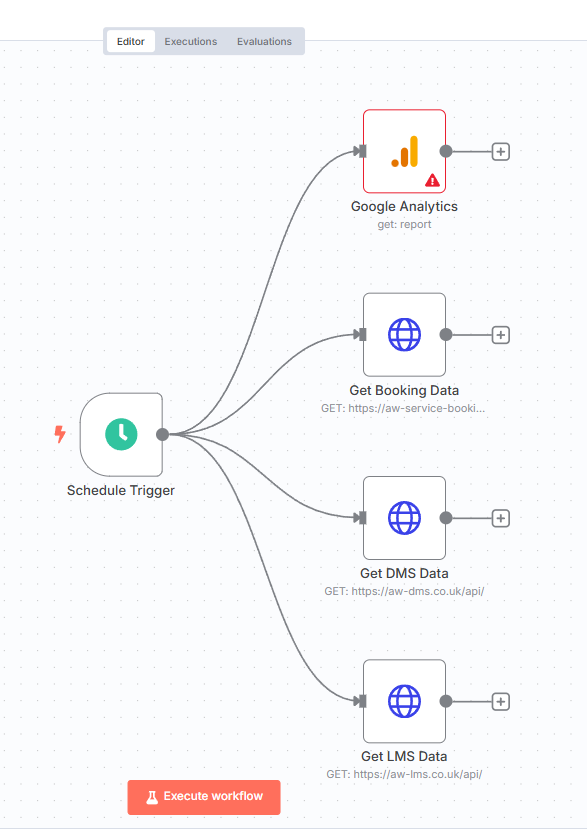
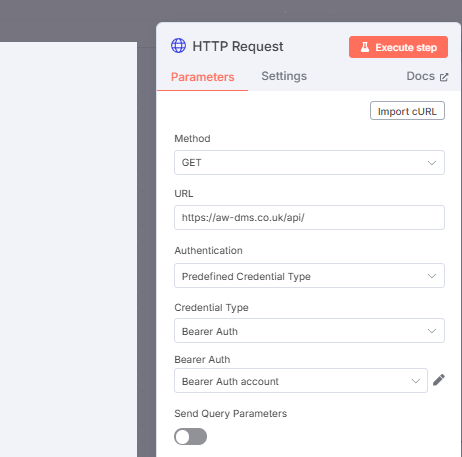
For the specialist software, you’ll need to set up a node using the systems API (see note below), which is a case of copying the query details from the vendor’s API documentation and authenticating:
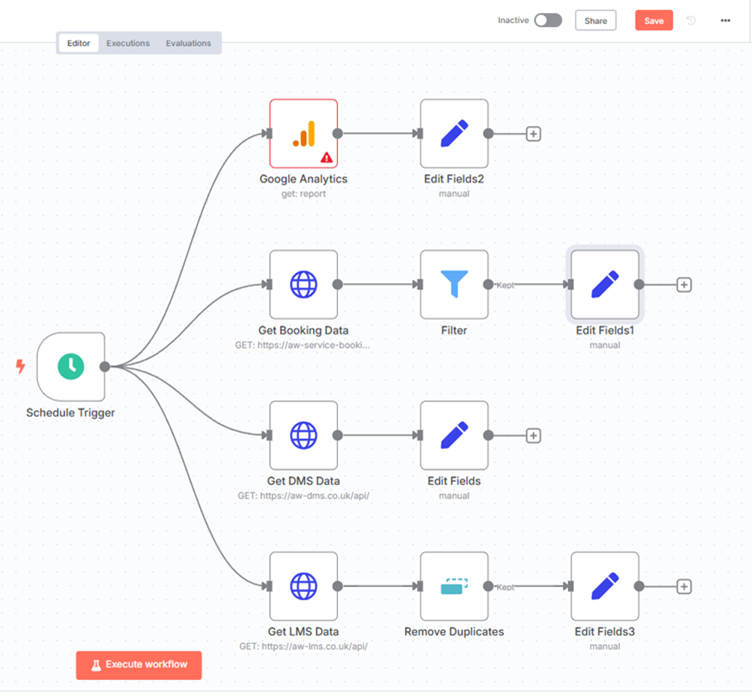
Step 5. Perform any Data Transformations
In this step, you can transform the data from any of your sources - this could be, for example, renaming a field or setting text to upper case. Very complex transformations are possible as well:
Step 6. Put the Data Where You Want It
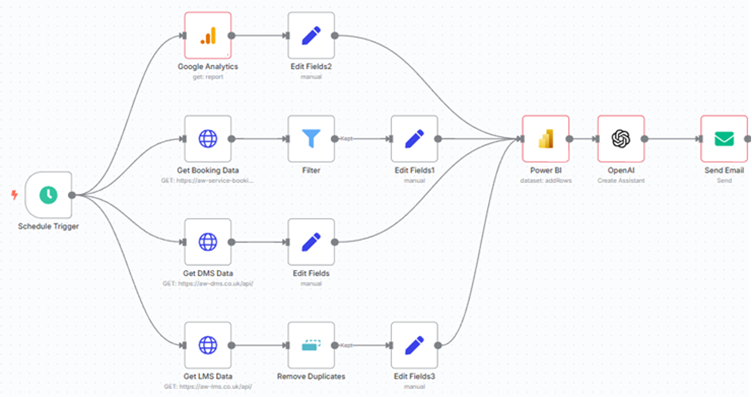
Now that the data is formatted as you want, you add another transformer to the end of your workflow that posts the data to the application you’re using for presentations, or a database, whatever works for you. As with the inbound adapters, you’ll likely find a pre-built adapter for products like Google Sheets and Power BI, but if you’re using a specialised reporting system, consult its API documentation for the settings needed to post the data. In the example below, I’ve added an OpenAI agent step. You could add any AI model to analyse the data for sentiment or other signals, and then send an email to relevant stakeholders. The rest is up to your imagination!
What if your system doesn’t have an API, or using it costs a lot of money?
This could be the case for older systems, and a workaround would be to explore ways to export the data. A good example is a DMS system: sometimes accessing data via an API can be an issue, but you can be pretty certain the system can output a CSV on a schedule. You can set the in-adapter node for that data to read from a CSV file periodically, and just make sure that the system that outputs the data is writing to that CSV file periodically.
So that’s it - you have your unified 360 customer view system with your own custom workflows and AI integration to suit your business needs, and you don’t need to change any of your existing systems or retrain your teams.
Taking it Further:
Your Own Proprietary Models
Now that you’ve started this journey, why not put the data into a database and use machine learning models to develop proprietary predictive algorithms for your business? These could predict consumer intent, drive website personalisation, calculate optimal stock profiles, or vehicle purchase prices. The key thing is it's derived from your data, in your locations, with your customers - It’s not a generic catch-all model that will work for some retailers and not others, this is yours.
Marketing Automation
Marketing automation is another powerful way to use connected systems like this. Customer actions across all of your channels can trigger campaigns such as email/sms, website personalisation, or offers. Triggers could include finance agreements expiring, specific work being done in the workshop, or visiting certain pages on your website.
A Significant Bonus
If you are housing your key data in a centralised database, you have reduced vendor locking. Porting that data to a new Lead Management System or DMS had potentially become easier - but most importantly, you’re not handing sovereignty over your data to a third party who you may or may not want to work with in the future.
Our Philosophy: Play Well With Others
At Autoweb Design, we provide the digital front door for dealerships—high-performance website front-ends and advert management platforms that drive quality enquiries and online sales. But we fundamentally disagree with the idea of walling off the data we generate.
Our philosophy is simple: your data belongs to you.
That is why our platform is built with a flexible API from day one. We want our systems to easily integrate with your LMS, DMS, and marketing tools. We believe dealerships thrive when they have the freedom to choose the best-of-breed software for every department and connect them effortlessly. We do provide software for DMS and Lead Management, but we don’t require our partners to use them. They are right for some situations and not for others, and we prioritise keeping up to date with the latest technology developments so we can help our partners build the best technology stacks with the latest specialised features.
We don't just preach this approach; we actively help our partners build it. Because we are experts in integration and API architecture, we work alongside dealerships to connect our front-end systems with the rest of their stack. We help you create that unified customer dream without the enterprise nightmare.
The future of automotive retail isn't about buying one massive system that forces you to change how you work. It is about connecting the best tools that do exactly what you need them to do.
If you are ready to make your systems talk to each other and take control of your data, let's have a conversation about what an open, integrated stack could look like for your dealership.
Frequently Asked Questions (FAQ)
What is iPaaS in the context of car dealerships?
iPaaS stands for Integration Platform as a Service. It is a suite of cloud services enabling the development, execution, and governance of integration flows connecting any combination of on-premises and cloud-based processes, services, applications, and data — without requiring custom software development.
Do I need to replace my current DMS to get a unified customer view?
No. By using open APIs and automation tools (iPaaS), you can build a connective layer that allows your existing Dealer Management System (DMS) to communicate seamlessly with your Lead Management System (LMS) and website, avoiding expensive "rip-and-replace" scenarios.
What if my automotive software doesn't have an open API?
If a legacy system lacks an API, you can often configure the software to output data via a CSV file on a regular schedule. Modern automation platforms can be set up to read these CSV files periodically, allowing you to integrate older systems into a modern data workflow.